Ask your coding agent, or fill in six fields. AppFoyer drafts your privacy policy, terms, support and account-deletion pages, hosts them, and hands you the links for Play Console and App Store Connect.
Everything a store review asks for. Nothing you have to run.
All of it on the free plan. Paid plans sell more apps and a custom address, never compliance.
With your coding agent
Say “make this app store-ready”
The plugin reads your build files, names your SDKs and drafts every page for your review.
claude
> make this app store-ready
Found   Firebase Analytics · Crashlytics · Auth
Drafted privacy · terms · support · deletion
Nothing is public yet. Review each page and click Publish.
The page Google Play requires. You are notified by email, Telegram or Slack; you delete in your own systems. We never touch your users' data.
A checklist that knows the rules
Every store requirement on one list, whether this app answers it, and a link to fix it.
Store form answers
Draft answers for Play's Data safety and Apple's App Privacy, built from your SDK list. Each names its source.
An address that looks like yours
Every app gets its own subdomain. On Pro, pick the name — foyernotes.appfoyer.page.
Knows when your build changes
A free pull-request check flags every new SDK or permission your pages may not cover yet, with the file and line.
app-ads.txt
Presets and line-by-line validation, served as plain text with no redirect. Verified by AdMob on our subdomains.
The legal pages are templates you complete, not legal advice. Start free →
Chrome extension
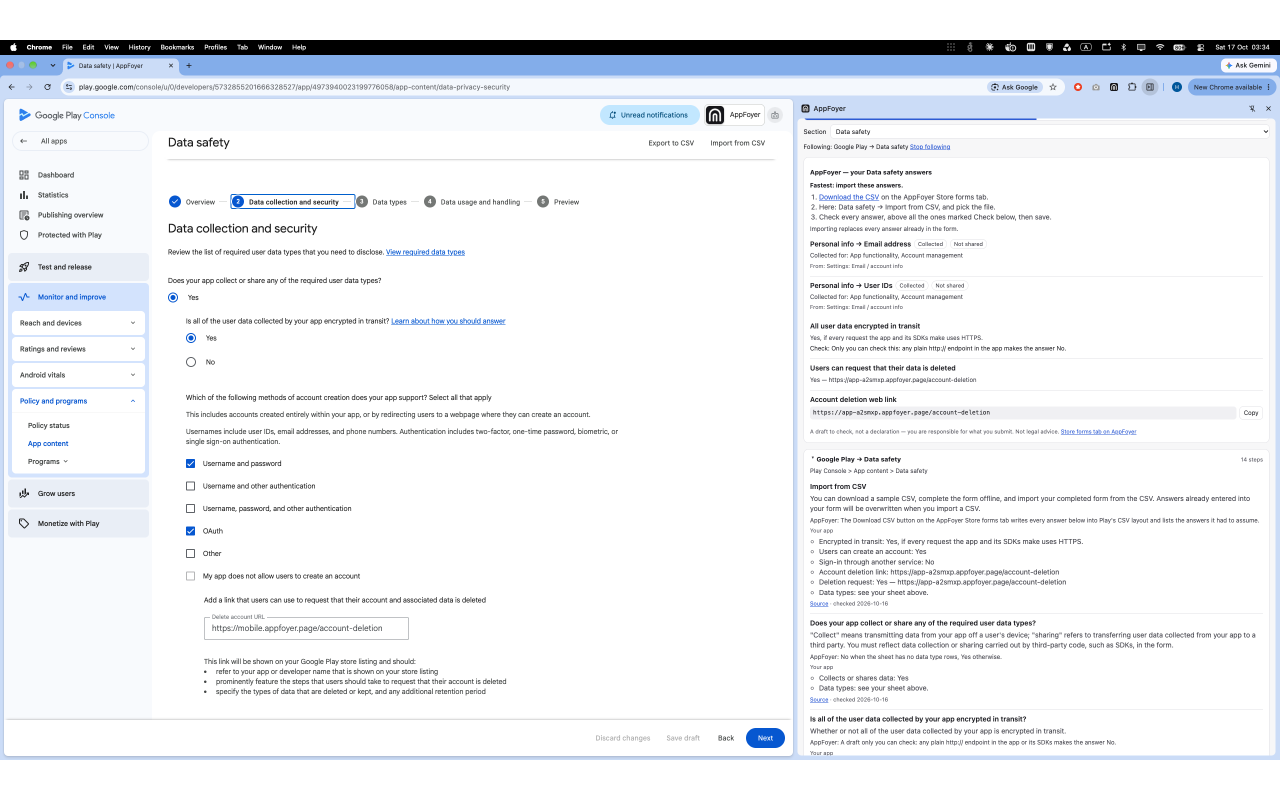
The checklist beside Play Console and App Store Connect
A free side panel that shows what each console page asks for, field by field, in the store's own words, with a link to the store's help page for every rule. It never fills in or submits anything: you fill in the console, the panel is the checklist beside you.
Store listing, contact details, privacy policy URL.The limits and formats Google and Apple publish, and which fields are required.
Data safety and App Privacy.Every question in the store's order, with the purposes as each store defines them.
Connect AppFoyer (optional, free, read-only).Your app's own values beside each field, ready to copy, and your store-form answers.
You can do all of this yourself, and for a single app it is a reasonable afternoon. The question is what it costs you on the tenth app, and a year later.
Static host + template
AppFoyer
Setup, per app
An afternoon
Minutes
Domain
≈ $12 / year
Included, on a subdomain
Account-deletion form
A form service or an edge function you wire up
Included
When a deletion request arrives
Goes wherever you wired it
Email, Telegram or Slack notification
app-ads.txt
Hand-written, hand-checked
Presets and line-by-line validation
Privacy policy content
Copy a template, guess the SDK list
Drafted from the SDKs in your build files
Setup, per app
Static hostAn afternoonAppFoyerMinutes
Domain
Static host≈ $12 / yearAppFoyerIncluded, on a subdomain
Account-deletion form
Static hostA form service or an edge function you wire upAppFoyerIncluded
When a deletion request arrives
Static hostGoes wherever you wired itAppFoyerEmail, Telegram or Slack notification
app-ads.txt
Static hostHand-written, hand-checkedAppFoyerPresets and line-by-line validation
Privacy policy content
Static hostCopy a template, guess the SDK listAppFoyerDrafted from the SDKs in your build files
That highlighted row is the one with an ongoing obligation attached. Google Play requires a page where a user can submit a deletion request, and a plain file host cannot take a POST — so you add a form service or an edge function. That part is not hard. It is just yours to keep running, on every app, for as long as the app is listed.
Trust & safety
What we do so a free subdomain stays worth trusting.
Every hosted page carries a footer
It names the developer, says the page is hosted by AppFoyer, states that we are not affiliated with any app store, and links a way to report abuse. You cannot remove it.
Your page content is Markdown, never raw HTML
Nothing you write can become a script, an embedded frame or a third-party image. Links to your own site, your store listings and your support address become clickable; anything else is printed as plain text. The only form on a hosted site is the account-deletion request form we provide, and it carries a bot-protection challenge.
Publishing is screened
Each publish is scored for impersonation and scam patterns before anything goes public. A false positive delays a page by a review; it never deletes your work.
Seeing a page that shouldn't exist? Report it — every report is read.
Questions developers actually ask
Do I need my own domain?
No. Each app gets its own subdomain, and that URL is what you paste into the store console. If you already own a domain, you can still use it for your app's marketing site — these pages are the compliance ones.
Can I point my own domain at these pages?
Not today. On the Pro plan you can replace the random subdomain with a name you choose — within naming rules that refuse reserved words, brand names and sign-in-sounding words like “login”. Custom domains are not part of the product yet.
Does AppFoyer delete my users' data?
No, and it cannot. The account-deletion page collects the request, stores it, and notifies you. Deleting the account inside your own backend is yours to do — that is what Google Play actually requires of you. Any wording suggesting otherwise would be false.
Are the generated legal pages legally valid?
They are templates you complete, not legal advice. They cover what the stores ask for and each page says plainly that the developer is responsible for its accuracy. If your app operates somewhere with specific requirements, have a lawyer read them.
Does app-ads.txt on a subdomain really work with AdMob?
Yes. In October 2026 AdMob reported "app-ads.txt file found and verified" for apps whose developer website is an AppFoyer subdomain, on both the App Store and Google Play. The file is served the way the specification requires — plain text, HTTP 200, no redirect. Set your store listing's website to your AppFoyer URL and allow AdMob up to 24 hours to crawl it. We have no crawl result of our own from other ad networks yet.
What if the .page domain is blocked where my users are?
Every site answers on a second domain as well: the same address with .app instead of .page. Same pages, same slug, same app-ads.txt — one site, two addresses. Some countries and networks block whole top-level domains, so if .page is unreachable for you or your users, use the .app address in your store listing and in your app. You switch which address the dashboard shows with one click.
What happens to my pages if I stop paying?
Nothing at all while the charge is still being retried — that runs for two to four weeks and no countdown of ours starts during it. Once the subscription is actually cancelled you return to the free plan: you pick which one app stays published, the rest stay online but read-only for a week, and come offline three weeks in. You are emailed on day 0, day 7 and day 18. Nothing is deleted at any point, and your custom subdomain is held for you and never given to anyone else — subscribing again brings it all back with one publish.
If my pages come offline, how do my users still request account deletion?
They still can. The account-deletion page is the one page we keep serving after an app is unpublished — read-only, hidden from search engines, indefinitely. Requests still reach you by email. Your users never chose AppFoyer and have no idea about your billing, so losing their route to you over an unpaid invoice would be our mistake, not yours. The file that does stop immediately is app-ads.txt, because ad networks require it, not an app store.
What if AppFoyer shuts down? My URL is in a store listing.
The fair question to ask a hosting service, so the answer is in our Terms rather than only in a blog post. If we ever discontinue the service you get at least twelve months' notice: your pages stay online the whole time, and new sign-ups stop immediately so nobody starts a submission on a URL that is going away. You can edit and republish for the first three months; after that the pages keep serving but stop changing, nothing is billed for the remaining nine months, and a prepaid period is refunded pro rata. Export everything — the Markdown of every page, your app-ads.txt, your settings and your deletion-request log — from the day of the announcement.
Can I get a refund?
Ask within 14 days of any charge — the first one or a renewal — and you get it back in full, no reason needed. Cancelling is one click in the customer portal, and you keep the plan until the period you paid for ends.
Can I write my privacy policy and terms with ChatGPT, Claude or another AI?
Yes. The privacy and terms editors each have a ready prompt, already filled in with your app's name, developer, support email, store links and the data you declared. Run it in any assistant — best a coding agent opened in your app's repository, so it names the SDKs your build actually ships instead of guessing — answer its questions, and paste the reply back. It lands in the editor, not on your site: you read it and publish it yourself. Both prompts are printed in our guides, and if you use Claude Code, the AppFoyer plugin does the job for every page without copy and paste.
Does it fill in the Data safety form and App Privacy details for me?
It drafts the answers; you enter them. Tick the SDKs your build includes, or let the Claude Code plugin find them, and the Store forms tab lists every data type each store asks about. It shows collected or shared, linked or used for tracking, and the purposes. Every answer names its source: the vendor's own disclosure, its privacy manifest, or our reading of the vendor's data list. Questions only you can answer, such as encryption in transit, are marked for you to check. Nothing is submitted to a store, and the answers are not legal advice.
What happens when I add an SDK after the pages are written?
Your pages keep describing the old build until you update them, and both stores expect you to. A free check catches it on the pull request: the Claude Code plugin records what the pages were written from in appfoyer.json, and a GitHub Action compares every pull request's build files with it. A new SDK or permission shows up in the job summary with its file and line, and running the plugin again updates the drafts and the record. It reads build files only and never changes a page.
How do I reach you if something is wrong?
Once you are signed in, open Support in the dashboard and write to us — on every plan, including Free. It is messaging, not live chat: we answer when we see your message, and the reply appears on the same screen. Before you sign up, or if you prefer, email support@appfoyer.com.
Can I edit what was generated?
Yes. Every page is Markdown with a live preview, whether a template or your agent wrote the first draft. Nothing is published until you publish it.
Get the URLs your store listing is waiting for.
One app, all five pages and app-ads.txt on the free plan. No card, and nothing a store requires is ever paywalled.